 English
 Deutsch
 Español
 Français
 Italiano
 Português
 Русский
 العربية
 हिन्दी
 日本語
日本語 简体中文
简体中文

 Android
 iOS
iOS Mac
Mac Windows


Making the Most of Firewall AI: Two Tips to Enhance Your Device
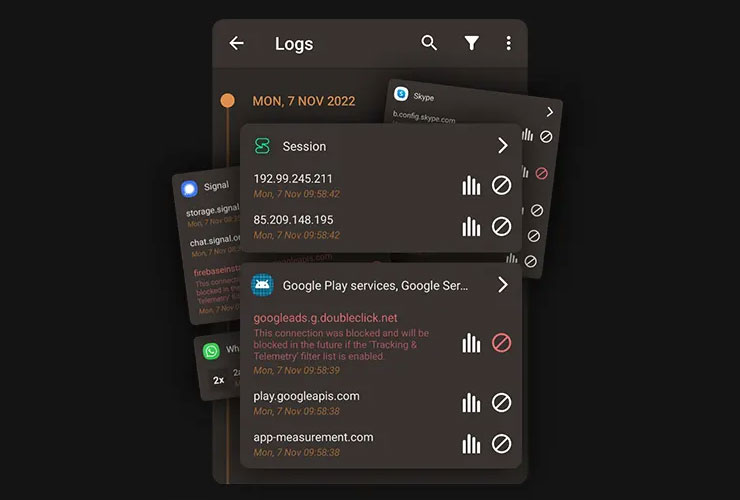
The internet has become an indispensable part of our lives. We rely on it for everything from socializing to online shopping, staying informed, and staying connected. However, with the increasing number of cyber threats, it's crucial to take additional measures to protect ourselves while browsing the internet. Firewall AI is a powerful app that helps users enhance their device's security.
In this article, we will explore two tips and tricks to make the most of your Firewall AI app: changing your DNS server and monitoring outgoing connections.
1. Change Your DNS Server: Enhance Your Privacy and Bypass Censorship
By default, your device connects to the DNS server provided by your Internet Service Provider (ISP). However, this default DNS server may not offer the fastest or most secure service. Switching to a different DNS server can provide you with improved online security, faster browsing, ad-blocking, parental control, and access to region-blocked websites.
Firewall AI makes it easy to change your DNS server with just one keystroke. The app finds the fastest DNS server and connects to it, speeding up your network connections. You can also connect to parental control servers that ensure safe web browsing for your family and protect against phishing, malware, ransomware, and malicious domains.
If you want to change your DNS Server, open the Firewall AI app, and click the settings icon on the top-right. Then please click "Network "and select "PRIVATE DNS," a DNS Provider that fits your needs.
2. Monitor Outgoing Connections: Stay Informed About Potential Threats
Firewall AI allows you to monitor and control the connections made by the apps on your device. To view these connections, open the app and click "Logs." You will see a list of apps and their connection attempts, with red entries indicating blocked connections and white entries indicating allowed connections. To gain more insight into why a connection was blocked, click on the small statistic icon to the right of each connection. You'll see details such as the IP address, port, country, and map, giving you a better understanding of the potential threat.
Firewall AI's built-in Intrusion Prevention System (IPS) automatically blocks intelligence agencies and government organizations' known servers and IP addresses, such as the FBI, CIA, NSA, and GCHQ. If there's an access attempt, you'll receive a special warning. The app also protects you from spy servers in countries like China, Iran, and Russia and mobile trackers.
In today's interconnected world, taking steps to protect your online privacy and security is more critical than ever. Changing your DNS server and monitoring outgoing connections with Firewall AI can significantly enhance your device's security.
These simple yet effective tips and tricks will provide you with a safer, faster, and more enjoyable browsing experience, ensuring your online activities remain secure and private. So start making the most of your Firewall AI app today and give yourself the peace of mind you deserve.
Learn more at https://www.protectstar.com/en/products/firewall-ai
 Go back